Posts

The Day My Devices Gossiped About Me (And Gave Me Chills)

I’ve spent thirty years in cybersecurity. I’m a veteran of thousands of live stages, warning wealth managers clients and CEOs about fraud, identity theft, and the dark corners of the internet. It takes a lot to rattle me. Frankly, I’ve seen it all.

But today, I got genuine chills. CHILLS!

It happened in the span of about sixty seconds, bridging two devices and 3 tech giants that aren’t supposed to talk to each other between my eBay messages, my 2 Apple devices, and my Gmail.

Here is the scenario: I was on my iPhone, using the secured eBay app. I was messaging a buyer and typed out a very specific, unique sentence. I typed exactly: “I figured they would end up in land locked Iowa or something!” (I sold two colossal lobster claws that I caught about 15 years back). This is my girls with the Dude. Long live His Dudeness.

Article content
El Duderino and the Cherubs.

I hit send, put down my phone, and spun around in my chair to my Mac. I opened up Gmail to write a completely unrelated email to a totally different person.

I typed the first four words: “I told the seller…”

And suddenly, there it was.

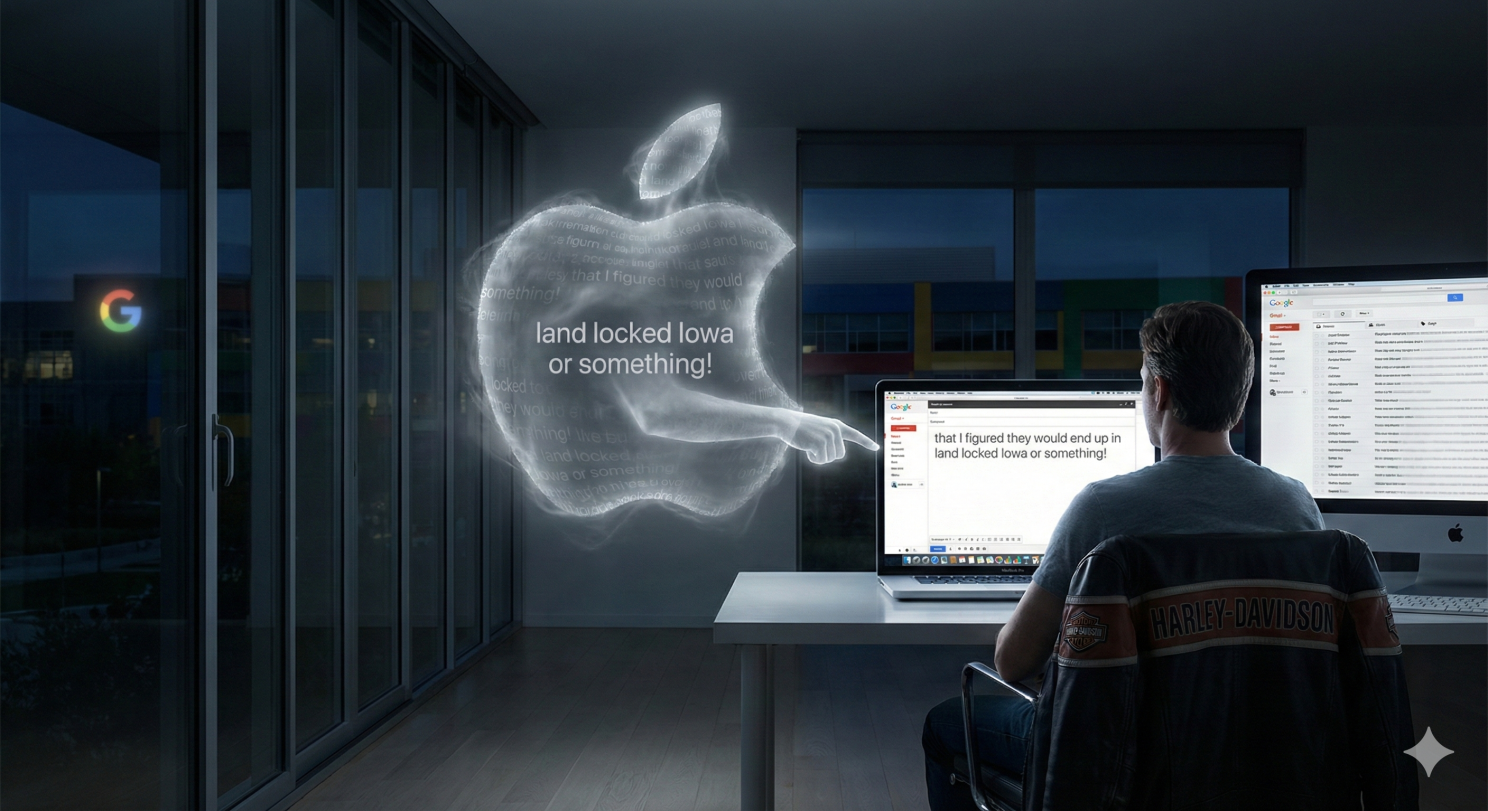
Ahead of my cursor, in ghostly gray text, in my Gmail on my Apple in my Mac again a totally different device the Google’s predictive text machine (from what I thought) offered to finish my thought: “…that I figured they would end up in land locked Iowa or something!”

I froze.

How the hell did that happen? HOW!!!! OMG! Do you see what just happened here?

My immediate reaction was the same as yours would be: Google is spying on me. How else could Gmail on a Mac possibly know what I just privately typed inside the eBay app on an iPhone? It feels like a violation. It feels like someone is standing directly over your shoulder, reading your private thoughts across platforms.

But as a security professional, I know that data doesn’t just teleport. It doesn’t magically jump from an isolated iPhone app into a Google browser session ON A MAC. There has to be a pipe connecting them.

I put on my forensic hat. I ruled out the easy stuff. I hadn’t copied and pasted the text. The clipboard wasn’t involved, no copy paste. Handoff is turned off on the iPhone. It doesn’t talk to any of my Mac devices. I checked my inbox—eBay hadn’t sent an email confirmation that Google could have scanned. There was no obvious digital trail. NOTHING!

So, I dug deeper. I had to find the invisible link between these two separate worlds. And what I found was a smoking gun that completely changed how I view device “intelligence.”

I was blaming the wrong suspect.

When I saw that gray predictive text in Gmail, cognitive bias kicked in and I of course assumed it was Google spying. But it wasn’t.

I was standing in Google’s house, but it was Apple’s ghost haunting the room.

Here is the simple truth of what happened:

When I typed that specific sentence about Iowa on my phone, “Predictive Text” was turned on in my iPhone settings. My iPhone keyboard didn’t just process the letters; it learned the pattern. It decided, “Hey, this is a unique phrase Robert is using. I’ll remember that to help him later.”
Article content

Because both my iPhone and my Mac are logged into the same iCloud account, my devices gossip with each other via Apples cloud, even though Apple’s “Handoff” is turned off. They are constantly synchronizing my habits for the sake of convenience.

The iPhone whispered that new “Iowa” sentence up to the iCloud, and iCloud immediately whispered it down to my Mac’s operating system in Gmail.

When I started typing “I told the seller…” in Chrome, it wasn’t Gmail offering the suggestion. It was my Mac’s own keyboard brain overlaying that ghostly gray text right inside of Gmail.

It was an optical illusion. It looked like corporate surveillance by Google, but it was actually ecosystem convenience by Apple, working exactly as designed—but working perhaps a little too well.

Why does this matter?

Because we constantly trade privacy for convenience without realizing the cost. We want our devices to “know” us so we can type faster. But we forget that “knowing us” means constant, invisible recording of our unique phrases and habits across every single screen we touch.

You weren’t hacked. No one was “listening” in the traditional, nefarious sense. Your own keyboard, Apple, was just being overly helpful, and your devices were gossiping behind your back.

We live in a world where our digital ecosystem is often faster than our own thoughts. If you want to exorcise that particular ghost, you have to go into your iPhone settings and hit “Reset Keyboard Dictionary” and turn off predictive text by going to “General” and Keyboards in your iPhone or your Mac. Or both.

Honestly, as upset as I was, I’m OK with it. Just a little freaked out about it. I will say, though, if you are up to no good, and sharing devices with family or coworkers, between Apples ecosystem and Google’s ecosystem, the truth will come out through Apple and Google’s being helpful and your words in the form of predictive text being used against you.

The Security Takeaway “Privacy vs. Convenience.”

  • The Myth: “Apps are listening to me.”
  • The Reality: “My devices are gossiping with each other.”

Until then, remember: if you type it on one screen, assume every other screen you own knows about it seconds later.

Robert Siciliano CSP, CSI, CITRMS is a security expert and private investigator with 30+ years experience, #1 Best Selling Amazon author of 5 books, and the architect of the CSI Protection certification; a Cyber Social Identity and Personal Protection security awareness training program. He is a frequent speaker and media commentator, and CEO of Safr.Me and Head Trainer at ProtectNowLLC.com

What are Coronavirus Contact Tracing Apps?

Two of the biggest tech companies, Google and Apple, are pairing up to build software that could tell people if they were recently in contact with someone with coronavirus. This tool is due out in a couple of months, and it will be built into iPhones and Androids. People would have to opt in to use the tool, and if they become infected, they must voluntarily report it.

coronavirusIt is pretty unusual to see these tech giants partnering up, since they are generally rivals who are constantly working to outperform the other. This shows us that the coronavirus is a pretty serious thing.

This software could be highly significant in regard to slowing down the spread of the virus. In fact, public health authorities have implied that better tracking of those stricken with coronavirus could absolutely slow the pandemic.

This all sounds well and good, but think about this, too. We can now see that two of the largest tech companies on the face of the Earth have a huge impact on our lives. A tool like this could raise some privacy issues, of course, and it won’t be the only solution, but it could help in the long run.

Tim Cook, the CEO of Apple, confirms that the goal of this software is to track the virus, but he also says that they are focused on respecting “transparency & consent.” The CEO of Google, Sundar Pichai said that the software has “strong controls and protections” in place for the privacy of the users.

With this tool, a person who has been infected with coronavirus would send a notification to an app, which would then send an alert to the phones of people who had been close to that person’s device. Sounds cool, but there is a catch; Google and Apple have to get public health authorities to agree to letting this information get accessed.

There are also a number of third-party tools already out there for contact tracing. This is why Apple and Google are stepping up and trying to reach more people. The companies also said that they would offer up the technology they were using to other apps, in order to make them even more reliable.

The goal, here, of course is to make us safer…we just have to make sure that our privacy isn’t being compromised in the process.

ROBERT SICILIANO CSP, is a #1 Best Selling Amazon author, CEO of CreditParent.com, the architect of the CSI Protection certification; a Cyber Social and Identity and Personal Protection security awareness training program and the home security expert for Porch.com

How to sign out of all Google Accounts

Let’s cut to the chase (never mind how you misplaced your phone): There are several ways to sign out of your Google accounts remotely. It takes three steps, and you’ll need the desktop version of Google. gg

  • On a mobile use a browser opposed to the Gmail/Google app and sign in at gmail.com.
  • Seek out “Desktop version” at the bottom of the window/browser. Click it. You may need to login again.
  • At the very bottom you will see “Recent Activity” in the right corner. Look below that to see “Details.” Click that.
  • A window will pop up giving you information about your account.
  • Look at the top of the page for a button, “Sign out all other sessions.” Click that.
  • And that’s it! Do this now to test it out.

You just signed out of your Google account. What this means is that anyone who might be in your account gets signed out or anyone who gets ahold of your lost or stolen phone/laptop etc will not be able to gain access, because they will need your password (which hopefully isn’t something dopey like 123password or password1, being that these are among the most commonly used passwords and thus very easy to guess at).

Keep in mind that Google has a device location tool. It works only when you’re signed in on the said device. So if you just signed out of all of your Google accounts, this location feature will be of no use. But if you happen to know precisely where your “lost” phone is, then it makes sense to sign out on all Google accounts.

Sounds odd, because chances are, if you know exactly where the phone is…it’s probably not in the hands of a crooked or nosy person. But you just never know.

For example, you may discover your phone is missing after you’ve returned from the gym. So you call the gym and sure enough, your phone was found in the locker room and turned in to the front desk. Thus, you know precisely where it is. However, who’s to say that a bored employee won’t tinker around with it?

If you know where the phone is, don’t delay in retrieving it.

Robert Siciliano is an identity theft expert to BestIDTheftCompanys.com discussing identity theft prevention. Disclosures.

Time to tighten up Google Privacy Settings

There is good news for the tech-unsavvy out there: Google has made their privacy settings easier to work with. This day has not come a moment too soon. “My Account” is Google’s new dashboard.

ggWhen you use any Google account, the giant company collects information on you. The new dashboard will reveal what information this is. My Account also has other privacy related features; check it out first chance that you get. It has the following three sections.

Security

  • If you get locked out of your Google account, Google will contact you via the phone number and e-mail address you’ll see in this section, and you can change them, too.
  • You can look over a list of apps, websites and more that have access to your Google account info. You can place restrictions on permissions.
  • Lists devices that have connected to your Google account.
  • You can change your password.

Privacy

  • Google collects information on you including what you watch on YouTube; this section reveals which information on you is saved.
  • This section controls what phone numbers people can reach you on Hangouts.
  • Additionally you can adjust your public likes and subscriptions on YouTube.
  • Third, you can alter the information that you share on Google+.

Account Preferences

  • Here you can select the language for your Google accounts.
  • Here you can delete your entire account or some of it.
  • You can adjust the accessibility features.

Think of how great it would be to view a list of all the information that Google has collected from your computer, tablet or smartphone…and then delete whichever items you choose. You now no longer have to use the excuse, “It’s too techy for me,” to avoid delving into the privacy settings and making adjustments to your liking. You have a right to know what Google gets on you and what everyone else on the planet can see, too.

Robert Siciliano is an identity theft expert to BestIDTheftCompanys.com discussing identity theft prevention. Disclosures.

Back Up Google And Facebook Data

We are increasingly reliant on online calendars and address books, but when you store everything in the cloud, there is the possibility that your essential data could evaporate.

Some insist that you have nothing to worry about but what if you got hacked and all your data was deleted? What if you temporarily lost Internet access, but you need your contacts or calendars?

Backing up any type of vital data is always a smart decision.  Here’s a few simple and inexpensive tools to back-up data you’ve stored in the cloud:

MyCube Vault, for Mac or Windows, is a free utility that backs up your Facebook data, Google Contacts, and Picasa photos and albums at regular intervals. You choose how frequently and where your data should be saved. Once you have installed the app and authorized it to access each of the services you want to back up, the process is painless and automatic. If you’re concerned about downtime or wary of keeping your data in the cloud, MyCube Vault is worth a look.

Backupify, for Google Apps, keeps independent backups of all your Google Apps data, where it can’t be stolen, corrupted or deleted, even by your own domain users. You can search, download, and restore your Google Apps data any time. Backupify offers a free trial.

In addition to using a cloud-based backup storage service, you should also back up this data locally on an external drive.

Robert Siciliano, personal security expert contributor to Just Ask Gemalto, discusses hackers hacking hotels on CNBC. Disclosures

Search Engine Doesn’t Need Kids SSN

When Google launched Doodle-4-Google, in which children can compete to design Google’s homepage logo, they requested contestants’ Social Security numbers in an effort to prevent duplicate entries.

Americans have become accustomed to handing over the last four digits of their Social Security number as a password or identifier for various accounts and applications. But with the development of new technologies that have cracked the code for the distribution of Social Security numbers, the last four digits have become as sensitive and valuable as the first five.

The coder or marketer at Google who believes it’s reasonable to request the last four digits of children’s Social Security numbers is probably someone who readily shares his or her own number, which is not a good idea.

Researchers at Carnegie Mellon University have developed a reliable method to predict Social Security numbers using information from social networking sites, data brokers, voter registration lists, online white pages, and the publicly available Social Security Administration’s Death Master File.

The New York Times reports, “Computer scientists and policy experts say that such seemingly innocuous bits of self-revelation can increasingly be collected and reassembled by computers to help create a picture of a person’s identity, sometimes down to the Social Security number… So far, this type of powerful data mining, which relies on sophisticated statistical correlations, is mostly in the realm of university researchers, not identity thieves and marketers.”

The primary issue here is new account fraud, or financial identity theft in which the victim’s personally identifiable information and good credit standing are used to create new accounts, which are then used to obtain products and services. Stolen Social Security numbers are often used to commit new account fraud.

Aside from subscribing to an identity theft protection service, it’s difficult to stop or prevent new account fraud. One way that online businesses can mitigate the issue would be to verify the reputation of the computer or smartphone being used to submit credit applications, rather than simply verifying the Social Security number or other identification information provided by credit applicants.

By evaluating a device for criminal history or high risk while its connected to the online site, creditors can automatically detect and reject fraudulent applications.  This worked very well for one Fortune 100 credit issuer.  A Forrester Consulting Total Economic Impact study found that the device reputation service provided by Oregon-based iovation Inc., identified 43,000 fraudulent credit applications and saved the financial institution $8 million USD over two years in reduced fraud losses and operational efficiencies that their fraud prevention process and team gained.

Robert Siciliano, personal security and identity theft expert contributor to iovation, discusses child predators online on Fox News. Disclosures

Google Adds Security to Search

The Internet can be a dangerous neighborhood, and safety precautions are a necessity. . IBM Internet Security Systems blocked 5,000 SQL injections every day in the first two quarters of 2008. By midyear, the number had grown to 25,000 a day. By late fall, attacks climbed to 450,000 daily. The US government servers and sites are targeted 60 million times a day, or 1.8 billion times per month.

While the government fights to protect itself, you and I are on our own, and most civilians are completely unprepared for an attack.

In the University of Cincinnati’s Journal of Homeland Security and Emergency Management, the authors write, “The general population must be engaged as active security providers, not simply beneficiaries of security policy, because their practices often create the threats to which government responds.” In other words, citizens need to take personal responsibility and start acting securely, rather than expecting it to all be done for them.

But Google is lending a helpful hand.

In December, they posted the following announcement on the Google blog:

“Today we’ve added a new notification to our search results that helps people know when a site may have been hacked. We’ve provided notices for malware for years, which also involve a separate warning page. Now we’re expanding the search results notifications to help people avoid sites that may have been compromised and altered by a third party, typically for spam. When a user visits a site, we want her to be confident the information on that site comes from the original publisher.”

You can see an example of a search result notification here. Clicking the “This site may be compromised” warning brings you to an article with more information, and clicking the result itself brings you to the target website, as usual.

My observation has always been if a person decides to use the Internet, they should take some basic courses via your local adult education offering and read up about how to log in securely . New scams pop up every day, and one has to be aware of their options.

Thanks, Google, for lending a hand.

Robert Siciliano, personal security expert contributor to Just Ask Gemalto, discusses online banking security on CBS Boston. Disclosures